Why Are So Many Businesses Using Proxy Servers?
If you’ve ever experienced:
- Your Facebook ad accounts getting banned
- Google scraping blocked after a few requests
- Amazon accounts linked together
- Slow and unstable proxy connections
Then you’re not alone.
The internet has become increasingly aggressive toward automation, scraping, and multi-account management. Platforms now track:
- IP addresses
- Browser fingerprints
- Geographic inconsistencies
- Suspicious connection behavior
This is why understanding how proxy servers work is no longer optional—it’s essential.
What Is a Proxy Server?
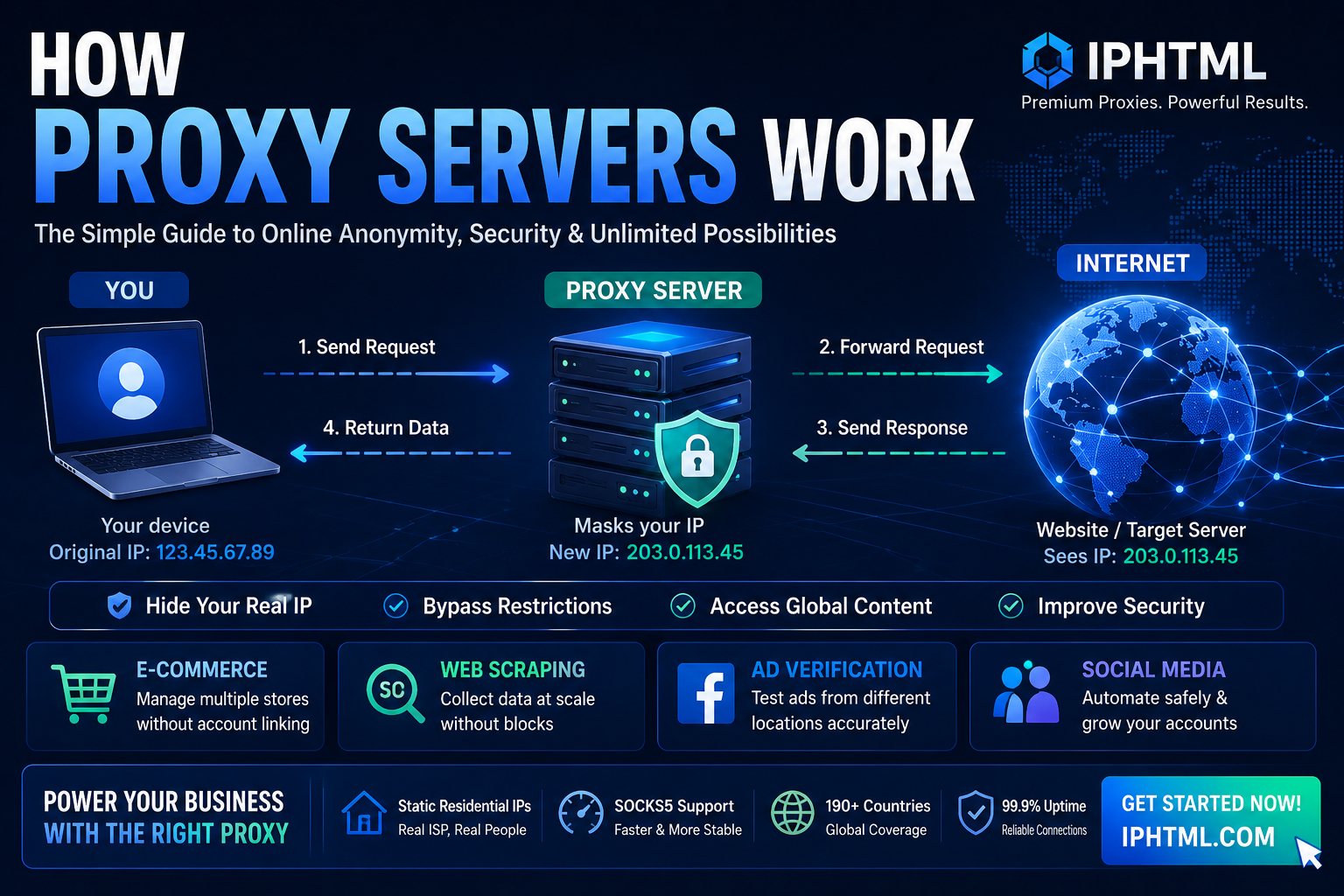
A proxy server acts as a middle layer between your device and the internet.
Instead of visiting a website directly:
- Your request first goes to the proxy server
- The proxy forwards the request to the target website
- The website responds to the proxy
- The proxy sends the data back to you
This process hides your real IP address and replaces it with another one.
In simple terms:
A proxy server is your digital middleman.
How Proxy Servers Work (Simple Explanation)
Here’s the basic workflow:
Step 1: User Sends Request
You try to access a website, platform, or API.
Step 2: Proxy Receives the Request
Instead of connecting directly, your traffic passes through the proxy server.
Step 3: IP Address Is Replaced
The proxy hides your real IP and assigns a new one.
Step 4: Website Sees the Proxy IP
The target website thinks the request comes from the proxy—not from you.
Step 5: Response Returns Through the Proxy
The data travels back through the proxy server to your device.
This entire process usually happens in milliseconds.
Why Websites Are Blocking Normal Connections
Most platforms today use advanced anti-bot systems.
If they detect:
- Too many requests from one IP
- Suspicious behavior
- Datacenter traffic
- Automated browsing patterns
You may face:
❌ CAPTCHA
❌ IP bans
❌ Account suspension
❌ Traffic restrictions
This is why basic proxies often fail.
The Hidden Problem: Cheap Datacenter IPs
Many beginners buy low-cost proxies and wonder:
“Why am I still getting blocked?”
Because websites don’t only care about the proxy protocol.
They also analyze:
- IP reputation
- ISP history
- Residential vs datacenter origin
- User behavior authenticity
A SOCKS5 proxy with bad IPs is still bad.
The Best Solution: SOCKS5 + Static Residential Proxies
Professional users combine:
SOCKS5 Proxy + Static Residential IP
Why?
Because this setup creates the most realistic browsing environment possible.
Why SOCKS5 Matters
Compared to HTTP proxies, SOCKS5 offers:
| Feature | SOCKS5 | HTTP Proxy |
|---|---|---|
| TCP Support | ✅ | ✅ |
| UDP Support | ✅ | ❌ |
| Traffic Inspection | ❌ | ✅ |
| Detection Risk | Lower | Higher |
| Performance | Faster | Slower |
SOCKS5 works at a lower network level and does not inspect traffic, making it:
- Faster
- More flexible
- More anonymous
Why Residential IPs Matter More
A residential proxy uses real ISP-assigned IP addresses from actual households.
This means websites see you as:
✅ A real user
❌ Not a bot
❌ Not a datacenter server
And static residential IPs provide:
- Long-session stability
- Better account trust
- Lower detection risk
Why Businesses Use Proxy Servers
1. Web Scraping & SEO Monitoring
Search engines aggressively block repeated scraping attempts.
Using residential proxies helps:
- Avoid CAPTCHA
- Increase scraping success rate
- Access localized search results
- Monitor competitors safely
2. Cross-Border eCommerce
Amazon, eBay, Etsy, and Facebook Marketplace all monitor IP behavior.
With static residential proxies:
- Each store can use a separate IP
- Reduced account linking risk
- Improved account longevity
3. Facebook Ads & Ad Verification
Media buyers use proxies to:
- Verify geo-targeted ads
- Test landing pages
- Manage multiple ad accounts
- Validate campaign visibility
4. Social Media Automation
Platforms like Instagram, TikTok, and X detect suspicious logins instantly.
Residential proxies help simulate real-user activity.
Why IPHTML Is Different
At this point, you probably realize:
The protocol alone is not enough.
The real difference is IP quality.
That’s where IPHTML stands out.
IPHTML provides:
✅ Static residential proxies
✅ Full SOCKS5 support
✅ Global ISP coverage
✅ High-speed stable connections
✅ Long-session reliability
Whether you’re scraping Google, managing eCommerce stores, or running ad campaigns, IPHTML delivers enterprise-grade proxy infrastructure.
How to Start Using Proxy Servers with IPHTML
Getting started is simple:
Step 1: Visit IPHTML.COM
Create your account.
Step 2: Choose Your Proxy Type
Recommended:
- Static Residential Proxy
- SOCKS5-supported proxies
Step 3: Configure Your Proxy
You’ll receive:
- Host
- Port
- Username
- Password
Most tools support SOCKS5 directly.
Final Thoughts
The internet is becoming harder to navigate anonymously.
Platforms now aggressively track:
- IP reputation
- Traffic behavior
- Browser consistency
Basic proxies are no longer enough.
If you want:
- Stable scraping
- Safer automation
- Better account security
- Higher ad success rates
Then understanding how proxy servers work is the first step.
The second step?
Using the right infrastructure.
Conclusion
A proxy server is much more than a privacy tool.
It’s the foundation behind:
- Modern web scraping
- Cross-border eCommerce
- Multi-account operations
- Ad verification systems
And when combined with SOCKS5 + high-quality static residential IPs, proxy servers become a powerful business advantage.
👉 Visit IPHTML.COM today and experience professional-grade proxy performance.